Hiển thị các bài đăng có nhãn Alibre. Hiển thị tất cả bài đăng

Thứ Hai, 15 tháng 7, 2013

Bright Future for Geomagic Design Users at First APAC 3D Systems Geomagic Meeting

9 July 2013 - The first 3D Systems Geomagic annual APAC meeting was held in Bangkok, Thailand. A broad range of training and information seminars were also conducted with a peak total attendance of more than eighty from the entire Asia-Pacific region including China, Korea, India, Malaysia and Australia. Ben Decker from CADDIT Australia attended this meeting for all three days, and met and shared experience with industry professionals in scanning, reverse engineering and 3D printing. An important take away from day one is the key role that Geomagic Design (formerly Alibre) will continue to have in software development at 3D Systems. This was confirmed in the same week when 3D Systems released a new simulation/FEA add-on option for Geomagic Design Expert, with other enhancements coming soon.

All in attendance discuss future vision of Geomagic

A future vision was shared of a full 3D rapid development process, including 3D scanning, reverse engineering, design, documentation, prototyping, verification, manufacturing and testing - of which Geomagic Design will play a central role. Also discussed was integration between individual solutions of the Geomagic product family and a new Geomagic Designer bundle which includes Geomagic Freeform and Geomagic Design. Australia users who have interest in Geomagic Designer should contact CADDIT Australia or 3D Systems directly.

A rainy but comfortable Bangkok for the meeting.

Thứ Hai, 3 tháng 6, 2013

3D CAD Sheetmetal using Excel in Geomagic Design

Geomagic Design 3D CAD (formerly Alibre Design) software from 3D Systems supports the use of Microsoft Excel files to drive design in all low-cost versions: Design Personal, Design Professional and Design Expert. Spreadsheet-driven parameters allow for company staff to specify design criteria without the use of any CAD software - only the final update need be applied using Geomagic. Microsoft Excel 2003, 2007 and 2010 are all supported in the software help documentation of Geomagic Design 2013. This article follows a simplified demonstration of setting up, linking to and executing Excel files for a sheet metal part.

To begin with, download Geomagic Design HERE (link). No special settings are required at this point during the installation. Note that Geomagic Design does not support integration with Open Office. By way of overview, our example team will generate example spreadsheets which we will use to update a 3D design, which will be saved and used to update a DXF file for CNC.
 
 
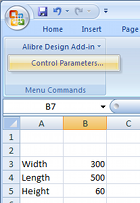
Every Geomagic Design installation includes an installation template which must be added to the Excel add-on list while running Excel once with administrator rights. Instructions as to how to do this with any supported version of Microsoft Office are available in the F1-help of Geomagic Design. Once properly installed, "Alibre Design Add-in" should be available from the Tools menu or Add-ins ribbon tab. Any numerical value cell may be selected to correspond to a Geomagic Design parameter, units specified and applied to a selected Geomagic Design file. For example we whip up something simple in Excel (shown right). Such a file can be created in Excel by anyone anywhere anytime (or it can be an imported CSV file etc)...

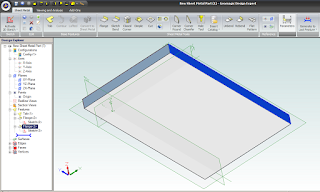
To update model parameters with the values listed in our spreadsheet, we need to start Geomagic Design and load the file in question. In our example we load the following basic Sheet Metal part, with overall parameters for "SM_length", "SM_width" and "SM_height":

 
Switching back over to our open spreadsheet, we select the Albre Design Add-in Control Parametrs (see above image of Excel). This opens a table in which cells are matched with parameter names:
 

To link spreadsheet values with model parameters, select an Active Session (model name currently open in Geomagic Design). All of the selected session's parameters will be listed by name. Now select the name of the desired model parameter from this list - and then the small "_" button down under Cell Reference and pick the workbook cell that you wish to link it to. Click the "Modify" button to finally change the parameter value to the one in the spreadsheet. Changes are shown immediately in Geomagic's active session model. Multiple changes can be made and applied at once by multi-selecting through the parameter list. If the spreadsheet is saved, the parameter links are saved with it.

To generate a DXF file of the final sheet metal design, a Geomagic drawing is used. Create a new Standard View. In the open Standard View Creation window, click the button "More Options". Check the option "Project as Flat Pattern" which will use the flattened version of the Sheet metal design for the projection view. Check that the projection scale is 1:1 and create the view. Once the flattened view is created, export the version of DXF which you require for CNC.

Geomagic Design is Australia's de facto low-cost 3D CAD alternative to SolidWorks and Autodesk Inventor. For more information about Geomagic Design or a free download, visit our website at http://www.caddit.net/cad-cam-software/geomagic.php

Thứ Sáu, 17 tháng 5, 2013

Geomagic Design 2013 Released on CADDIT Australia

CADDIT Australia has released the latest version of Geomagic Design 2013 (formerly called Alibre, now owned by 3D Systems). Geomagic Design 2013 is the most significant release since 2009, featuring hundreds of enhancements, improvements and fixes.

The base price of Geomagic Design remains at a modest $220. Geomagic Design is Australia's de facto choice for low-cost 3D parametric, mechanical design software which offers features similar to AutoCAD Inventor, SolidWorks and Solid Edge at a fraction of the cost. All versions of Geomagic Design includes advanced STL file export for 3D printing and rapid prototyping.

Geomagic Design Professional continues to offer photo-realistic rendering, STEP import/export and full 2D detail drawing. Geomagic Design Expert adds comprehensive sheet metal, direct (non-parametric) modeling, variant design and motion simulation capabilities. Geomagic Design Expert also offers reading of SolidWorks sldprt and sldasm files, Solid Edge and AutoCAD Inventor files. GeoMagic Exchange is a lower cost option available specific for CAD translation.

A full 30-day free trial of Geomagic Design can be downloaded from CADDIT Australia at this link:
http://www.caddit.net/cad-cam-software/geomagic.php

Chủ Nhật, 17 tháng 3, 2013

Alibre Design 2013 Preview - The Best Alibre Ever

The folks over at Alibre USA have been hard at work at what looks to be the best release ever of their flagship CAD software. Alibre is the defacto CAD software for low-cost parametric 3D mechanical part and assembly design in Australia. Priced modestly from A$220 for the base hobby user package to A$2200 for the top-end version including motion simulation, direct editing, variant design and direct reading of CATIA and Unigraphics files, Alibre is a more viable option than SolidWorks or Inventor for smaller budgets. Alibre 2013 will introduce literally hundreds of improvements in all areas of 3D modelling, assembly design, 2D drafting and section views, sheet metal design, bill of material and more. The overview document Alibre has provided to CADDIT Australia listing these enhancements is 59 pages long. Here are some highlights:

USER INTERACTION CONSISTENCY: In previous versions of Alibre, CRTL and SHIFT multiselect treated were differently in the various modes of Alibre. Alibre 2013 now uniformly implements multi-selection in the Design Explorer and Work Area, using Ctrl and Shift. More commands can also be applied to multiple objects in a single operation such as anchor, hide, suppress, align and scale view etc. Right-click behaviour has also been improved to ALWAYS show the options that are available to all selected items. (Previously there were cases where a right-click actually deselected all selected items.) "Apply" buttons have been added to numerous dialogue boxes so that changes can be seen before leaving many commands. Conflict visibility has been improved, dragging the "Dog Bone" has been fixed, real-time measurement data now appears in the status bar, some menu items have been consolidated, even the licensing dialogues have enjoyed some housekeeping. There is now a much more consistent user experience with the overall interface of Alibre. This is good new to those using Alibre for their everyday mechanical design work :)

UNDER THE HOOD: Alibre 2013 will be powered by Dassault's new ACIS V23 kernel, released six months ago (see announcement here). This means better modelling and problem-solving on the geometry level of Alibre. STEP file export includes multi-part assembly and drawing "packaging" (somewhat similar to progeCAD "eTransmit"), STL publishing for 3D printing enjoys better support for binary STL, and control of the STL data.

SKETCHING AND PART MODELLING: Sketching performance is significantly improved and more responsive, especially when zoomed in. Dimensions can now be placed between concentric arcs and circles to define the difference in their radii. All disjoint ends of a sketch (caused by DXF or DWG import, etc) are automatically healed when the active Sketch is exited. User is no longer prompted that sketch problems exist when only Disjoint Ends exist, as they are automatically healed. Pressing Escape while in 2D Sketch Mode now make the Select tool active. User can now import Points from a CSV file into a 2D Sketch as well as for 3D sketches. User can also designate any 2D dimension to be Driven during dimension placement or after dimension placement by modifying the dimension. Driven dimensions update in real-time as figures are moved or further define objects in the sketch. Driven dimensions can also designated to show up in the Equation Editor as a parameter. This effectively enables use dimensions from one part in another part. For part modelling itself, the THREAD tool has been improved with drop-down menus of thread definitions.

OTHER IMPROVEMENTS: In this blitz review of the upcoming release of Alibre 2013 we haven't even started to discuss what's new in Assembly design, drafting, sheet metal, BOM, third-party bonuses etc and this article would be WAY to long to include them all. There is one improvement we picked from sheet metal we wanted to mention here. There will be a brand new tool which allows designers to create sheetmetal bend lines directly from a sketch, complete with rips. These bend lines are used to fold a tab or flange. This is particularly useful if you are trying to recreate a sheet metal part from an imported 2D drawing of a flat pattern:

It is important to note that Alibre Design 2013 will not support Windows XP, except for general how-to questions unrelated to anything in the operating system. Users really need to be using Alibre 2013 on a computer running at least Windows Vista or newer. Users choosing to remain back with Alibre 2012 on Windows XP and on active subscription will continue to be supported. For further information about this upcoming release of Alibre 2013 in Australia contact CADDIT.net (link). A further announcement will be posted here when the software is availble for download and trial.

Thứ Hai, 31 tháng 10, 2011

Alibre 2012 Now Released - Overview

Alibre 2012 was released recently on CADDIT Australia. Alibre is an affordable, easy-to-use 3D CAD software for mechanical design of parts, assemblies and design drawings. Files from SolidWorks, Solid Edge, Autodesk Inventor and other mechanical design software can also be used in Alibre. Alibre is best known for its low cost and simplicity: users can easily create complex 3D CAD designs for the fraction of the cost of other systems.

Alibre 2012 offers a completely reworked graphical user interface, with a style similar to other Windows 7 productivity applications. New tools have been added for surfacing, sketching, relations and more. .


Alibre Design introduced in-place editing last release, as an enhancement in 2D drafting. This year, in-place editing toolbars have been introduced for part modelling, notably for sketch creation. In-place editing greatly improves speed-of-interface by reducing mouse travel for each command, and need to manually change toolbars. Alibre Design 2012 also lets you project sketches to other sketches, letting you reuse the work you've already done in new features.

Two major enhancements have been included for surface modelling. Surfaces may now be pasted directly from either MoI (free with Alibre Design Expert) or Rhino CAD. A complete new toolset for surface manipulation includes commands for Split Surface, Trim Surface, Stitch, Convert Solid to Surface, Create Surface from Face, and Delete Face.

2D mechanical drafting enhancements include support for multiple leaders from a single annotation, more flexible hatching, improved drafting geometry constraints and border selection for notations. .

Other general improvements include the placement of InterDesign relations in Alibre Design's feature tree and secondary cuts for sheet metal parts. For a free 30 day trial of the new Alibre 2012 - either as Windows XP 32-bit or Windows 7 64-bit native application - download Alibre 2012 HERE.

CADDIT has been supporting Alibre Design products in Australia since 2008. For more information about Alibre Design in Australia, contact CADDIT.net HERE.

Thứ Năm, 24 tháng 3, 2011

SolidWorks Alternative in Australia

SolidWorks, Inventor and Solid Edge are just some examples of legacy 3D CAD solutions supported by Alibre Translate - a feature available with Alibre Design Expert at no additional cost. For those not familiar with Alibre, Alibre is an easy-to-use low cost parametric 3D CAD system mainly for mechanical engineering design of parts, assemblies, sheet metal and more. Alibre Translate (Now free with Alibre Design Expert) not only offers direct Solidworks file import of .sldprt and Solidworks .sldasm assemblies, but also Autodesk Inventor .ipt and .iam files, Solid Edge files and much more.
Alibre easily handles large SolidWorks assemblies like this laptop computer

SolidWorks users should have little trouble understanding Alibre's straight-forward solid modelling and assembly design interfaces. feature sketch, extrusion, subtraction, shelling, draft, lofting are all functions also supported in Alibre Design. Alibre Design Expert adds non-parametric (direct) editing techniques commonly found in systems costing several times more than Alibre Design Expert (less than AUD $1500 in Australia - see prices here). Expert also includes Keyshot photo-rendering and Moi 3D surfacing software at no additional cost.

Alibre also offers fully integrated CNC software for 2.5-axis, 3 4 and 5-axis milling machines. Alibre CAM basic comes free with Alibre Design Expert, offering as the name indicates basic 2.5-axis milling from within the Alibre interface. A full comparison of Alibre CAM options are shown HERE. Solidworks users can also import their SolidWorks model into Alibre CAM for manufacturing.

Alibre Design is an easy, inexpensive and intuitive option for SolidWorks users. Although Alibre 2D detailing and drafting environment is quite comprehensive, Alibre also integrates well with advanced 2D CAD drafting solutions like Autodesk AutoCAD or progeCAD, a low-cost AutoCAD clone. A free 30-day trial of Alibre Design can be requested directly from CADDIT Australia by following the links and downloading HERE.

Thứ Hai, 22 tháng 11, 2010

Alibre 2011 Update with New MoI Surfacing Software

Alibre Design 2011 was first released in late 2010 offering a number of important new features:
  • Alibre's first native 64-bit version
  • New "in-place editing" UI framework
  • New MIRROR and SCALE modelling commands
  • On-the-fly library creation
  • Direct 3D Solid->SheetMetal conversion

MoI:
In addition to these new features, Alibre Design Expert user licenses sold after 2 December 2010 are now entitled to get MoI - Moment of Inspiration - freeform surfacing software. At this point the best link between MoI and Alibre itself seems to be using STEP data, although ACIS SAT and IGES are also offered by MoI (the IGES interface seemed to loose the most data in our lab test, but we were expecting that). One major advantage MoI offers is a "point-and-click" workflow that doesn't require use of special ALT-key combinations, which makes it perhaps more practical for use on tablet PCs.


KeyShot for Alibre:
"KeyShot for Alibre - Basic" is new realtime photorealistic rendering software offered with
Alibre Design Professional and Alibre Design Expert. The updated capabilities of KeyShot for Alibre (formerly "KeyShot for CAD") are outlined in this brochure, and summarized in the chart provided below:

KeyShot for Alibre Edition Basic (shipped w/ Pro & Expert)KeyShot for Alibre Edition (optional)
Max Real-time Resolution 1024x768 pixels 1920x1080 pixels
Max Non Real-time Resolution N/A 2500x1600 pixels
Render with alpha channel No Yes
Extra Control over Render settings No Yes

It is worth noting that, although Alibre Design is now available as a native AMD64 bit application (Windows 7 compatible) many of the Alibre add-ons such as Alibre CAM and Alibre Motion are not yet. The 32-bit version Alibre add-ons will not work with Alibre 64-bit software and require Alibre 32-bit to install and run. However there seems little problem in running Alibre 32-bit version on a 64-bit PC now. Since the first major release of Alibre's latest version of their easy-to-use 3D CAD system, a few minor bugfix updates have also been made available and the latest version of Alibre can be downloaded HERE.

Thứ Năm, 19 tháng 8, 2010

Alibre Design 2011 - New Features

Alibre Design is one of Australia's most affordable mid-range 3d mechanical CAD solutions. Within the next several weeks Alibre 2011 is expected for release. This major release both adds new features as well as improving many existing ones. A crucial focus for Alibre Design 2011 has been improvement in efficiency and ease of use, including fully customizable keymaps and in-place editing. Developers may also be interested to know that much of Alibre is now written in the Microsoft C# programming language, which allows developers to add new features even faster than before. Here are a few of the many feature enhancements of the new Alibre 2011 version release:

Alibre Design 2011 will offer Alibre's first native 64-bit version, which basically means you can make larger, more complex assemblies and have more files open simultaneously, without the restrictions of older 32-bit operating systems and memory access. With the offering of a
64 bit version comes a tremendous increase in both what can be created in Alibre Design and the types of workflows people can use. Both Alibre Design Professional and Expert versions will be offered as 64-bit editions.

Direct 3D Solid->SheetMetal conversion will allow CAD designers to take ordinary 3d solid models or imported 3D files (like STEP or Parasolid) and automatically convert these into sheet metal parts that can be flattened and machined in Alibre CAM. Of course, the resulting sheet metal parts are fully associative to their original counterparts, so that if you change the original model, the associated sheet metal version will update automatically. The new solid to sheet metal conversion tool will only be offered with Alibre Design Expert edition.


Alibre Design 2011 will add new MIRROR and SCALE modelling commands. Alibre 2011 will offer a new "Double Intersect" sketch command that allows you to join two figures at their theoretical intersection. The tool has several modes, all completely transparent to you, which adapts to the types of figures and orientations that a designer encounters. Alibre 2011 will also make it possible to create libraries of your most commonly used hole types on the fly. Simply fill out the form, type a name, and press Create. The hole's parameters can now be recalled instantly via the Presets dropdown. Alibre 2011 will also offer a new multi-plane creation tool, which can be useful when drawing multiple solid loft profiles, etc.

Alibre will begin rolling out their new "in-place editing" UI framework with Alibre Design 2011. In-place editing takes floating toolbars and context menus much further by opening relevant toolbars and icons just by selecting entities. Any changes are immediately displayed in real time, and to close in-place editing toolbars, we simply move the mouse away from the entity we initially selected. Alibre Design 2011 will offer this framework first in its Detailed Drawing Workspace, but is eventually to be deployed in various forms throughout the product.

Until release, CADDIT will begin offering free upgrades to all new Alibre Design Expert users a free upgrade to Alibre Design Expert 2011 upon release - but while still at current sale prices for V12.1. Alibre is suitable for a wide variety of mechanical design projects, including machine design, fixture design, vehicle and product development, sheet metal products and more. A free full-version trial of the current
Alibre Design software in Australia can be downloaded here. For further questions about Alibre products, CADDIT support can be contacted HERE.

Thứ Ba, 15 tháng 6, 2010

"Alibre Design Personal" Replaces Standard & Xpress versions; New Alibre Products

Alibre is a powerful but easy-to-use 3D mechanical CAD package which is distributed and supported in Australia through CADDIT.net. Beginning in mid-May, Alibre no longer offered a "Standard" version of their CAD software. Alibre Design "Standard" has been replaced with the Alibre Design "Personal" version, mainly for hobby use. Also, the free version referred to as "Alibre Design Xpress" will no longer be available to new users. Current users of these products, however, should be able to continue using them as-is without any change to their software. A note to those who purchased Alibre Design from us during our last promotion, well done - you have a package worth about $1000 for under $200. Alibre Design Personal now has some new limitations in comparison to its predecessor, Alibre Design Standard:
  • Single install license (no take-home license, multiple keys etc)
  • Advanced Import / Export features are deactivated
  • Import DWG / DXF is still enabled
  • Export .STL is still enabled for 3D printers
  • Publish 3D PDF (for models only) is still available
  • No STEP, IGES, SAT, Rhino, image files
  • Files are not enumerated unless you select All files (*.*)
  • Turn-off Advanced Detail Drawing (see further..)
  • No Bill of Materials
  • No Detail, Section, Partial, or Broken views
  • No views for Centers, Cosmetic Threads, External Threads, or No Hole Call-outs
CAD users looking for competent 3D mechanical CAD software are really encouraged to at least go with Alibre Design Professional now. Algor DesignCheck FEA is now called "Simulation Express" from Autodesk and will continue to be available as before. Alibre also has a new partner for delivering photo-realistic rendering to all Alibre Design Professional and Alibre Design Expert users. Luxion's KeyShot For CAD is now included in both versions and is available in Australia from CADDIT. Other Luxion users include PTC, Cadkey, SpaceClaim and Rhino. NOTE Alibre expects to also have new KeyShot BIP file export enabled within Alibre Design by the end of June.

KeyShot For CAD allows Alibre Pro and Expert users to create full photo-realistic images for their model within minutes. And - much like Alibre itself - Keyshot is easy to use. Drag-and-drop materials, preset lighting, and real-time updates give you the final result all the time. KeyShot is the first and only rendering application that offers real-time ray-tracing. This means that your model is constantly being rendered as you zoom, pan, rotate, and apply materials and lighting presets. For more information about Alibre Design 3D CAD in Australia feel free to CONTACT CADDIT.net. A free 30-day PROFESSIONAL trial of Alibre Design can be downloaded HERE.

Thứ Hai, 1 tháng 2, 2010

Alibre Price Now Just $99 in Australia, Alibre 12.1 Released

CADDIT has released Alibre 12.1 3D CAD Software in Australia, with the following new permanent price structure:

Alibre Design Standard: AUD $99.00
Alibre Design Professional: AUD $549.00
Alibre Design Expert: $1099.00

Alibre Design can be downloaded directly from CADDIT Australia HERE. This software will run in 30-day trial Professional mode before reverting to Alibre Design Xpress. All prices are listed ex-GST.

New pricing for upgrades and maintenance have also been published on CADDIT for Australia. For a complete price list of Alibre Design software and add-ons, see the CADDIT online shop HERE.

Thứ Tư, 13 tháng 1, 2010

A Preview of Alibre CAM 2.0 CNC Software

The upcoming release of Alibre Design 12.1 (SP1) will include major enhancement to the basic CAM software included free with Alibre Design Expert, as well as the four- and five-axis options available for Alibre CAM Professional and Alibre CAM Expert. Improvement to the Alibre CAM Interface will make CNC programming inside Alibre Design much easier and enjoyable to do. Here is one comparison between the crowded old (left) tab interface and the new (right) cascading style:

But more than the lookand feel of Alibre CAM will change. A new entry method has been added to 2.5 axis profile milling operations allowing you to have more control over the entry angle.You can now create tabs/bridges for 2.5 axis profiling operations. You can specify the bridge height and length. You can also specify whether you want to use a particular number of bridges which will be equally distributed around the profiles or you can set an exact distance between bridges. Below is an example of the same cut-outs using 5 bridges and 10 bridges per profile.

The Tool Libraries will allow "drag and drop" of pre-defined tools into the active tool set. There will also be an option to immediately preview a tool upon creation.

Alibre CAM 2.0 will now support avoidance regions to specify where the tool should not cut, for example to avoid clamps holding the stock material down on your CNC machine. Flat faces can be directly selected as machining / avoidance regions instead of having to use sketches. You can also select the starting point for the engagement of the tool for Machining Operations defined by sketches.

Alibre CAM Standard will offer along-path-3D-entry for 3 axis horizontal finishing offers more control over surface finish for steep areas of parts. Specifying the engage angle and path height allows you to control the smoothness of the engage motion, helping to eliminate unwanted marks on the cut part that would otherwise need to be buffed out later. Alibre CAM Professional will also enjoy improvements to 4 axis milling.

Alibre CAM Expert will add a new 3D Offset profiling method, 3D Offset pocketing for making constant offset tool paths on the part surfaces, 3 axis pencil tracing now offers multiple passes & 3 axis valley re-machining allows split cuts, step over and cut control. Tool Holder Collision determines the minimum tool length required to avoid collision.

Alibre Design is sold in Australia by CADDIT. Download Alibre Design / Alibre CAM in Australia for a free 30 day "Professional" trial before software reverts back to free "Xpress" mode.

Thứ Ba, 8 tháng 12, 2009

Alibre 3D CAD Software "84% Off" Sale from CADDIT Australia

Alibre Design Australia PromoAlibre has granted authorization to CADDIT Australia to offer the latest version of Alibre Design version 12 with at least AUD$1200 saving (84%) for these last few weeks of 2009. Why are we posting this to our blog? 1.This is not an Alibre 11 sale. This sale applies to the newly released Alibre Design version 12, including the features discussed earlier on our blog HERE. 2.It's a near give-away. Even if a company already uses another 3D CAD/CAM system, Alibre Design easily supplements as a stand-alone sub-assembly designer, detail drawing workstation or even just a STEP or DWG viewer.

Pricing for Alibre Design from CADDIT Australia until 12AM 1 January 2010 EST:
Alibre Design Standard: 239.84+GST
Alibre Design Standard: 859.00+GST
Alibre Design Standard: 1199.00+GST

A full version of Alibre Design can be downloaded HERE. If the user registers our download version using a valid address in Australia, you can buy Alibre software online HERE at this sale price until 1 January 2010 12 AM EST.

There are also some discounts offered on Alibre maintenance and upgrades HERE.

Thứ Ba, 6 tháng 10, 2009

Alibre V12 Released in Australia, V11 Upgrade Information

Sydney, Australia - CADDIT announces that the Australia localized version for Alibre Design is available for free download HERE. Alibre V12 offers new features and enhancements over V11, particularly when working with large assemblies and in "shaded & visible edges (wireframe edge)" graphics mode. CADDIT recommends Alibre Design V12 as Alibre's strongest feature/dollar CAD value product release yet. A full list of enhancements can be read in the Alibre Design README document after installation.

It's worth noting that a few adjustments have been made in packaging. Alibre Design Expert now includes
Alibre Translate (for reading CATIA, Inventor, Pro/ENGINEER, SolidWorks, SolidEdge etc) free. Alibre Design expert also includes Alibre CAM 3 axis CNC milling, Alibre Vault PDM, Machinist Toolbox and Alibre Motion for mechanical simulation.

Both Alibre Design Expert and Professional versions include a single license for Algor DesignCheck single part linear FEA, direct editing, extended part libraries and
Hypershot Web photo-realistic 3D rendering studio.

Current users of Alibre Design 11, as well as those who recently took advantage of the recent Alibre Standard promotion sale, may
upgrade their account to version 12 by clicking HERE, logging in and following the instructions to download the new Alibre 12 trial version. NOTE: Alibre 11 users in Australia will need paid and active Alibre Maintenance to upgrade to version 12. Alibre 11 users may still buy into maintenance by clicking HERE.

The full procedure for Alibre 11 upgrade to version 12 is also available in this
PDF document. Comments about this new release of Alibre Design can be posted to our new Alibre Forum.

Thứ Tư, 26 tháng 8, 2009

Preview of Alibre Design 12 Release, New Features

Only days remain before the public release of Alibre Design 12 as of time of this article. Alibre 12 definitely continues the standing tradition of delivering powerful, easy-to-use features at low cost. Here is a list of some of them, grouped by their work space:

New commands and tools in Alibre Design:
Alibre Design will offer a 3D-text feature tool allowing text to be added as a parametric part feature. Individual features will support colour change for better identification, and the user will also be permitted to set the default 3D new part colour. Edit commands will include multiple clipboard paste in "rubber stamp" mode. Toolbars will be more customizable, and additional box select modes will speed up editing. Editable 3D section veiws, colour schemes and light sources are also supported now.


The Alibre Sketcher will display missing constraints as degree of freedom callouts (with configurable colourisation). It will also offer optional real-time dimensioning and placement while geometry is drawn, rather than requiring this be completed as an additional design step. This option saves users considerable time in constraint specification. Alibre Sketch will also offer quick bi-directional conversion between model sketch figures and reference geometry. Constraint and snap options for drawing have been added, as well as a new axis mirror option. 2D drawing space will support a new freeform table creation for relevant model data fields.

Alibre version 12 files will offer a convenient thumbnail view from both Windows Explorer and Alibre Vault PDM, which makes file selection easier.


Assembly:
The assembly space move and rotate commands have been merged into a single dialogue for faster model placement by the user. Assembly part arrays / patterns now offer placement preview. View performance for large assemblies has been greatly improved.


Alibre Sheet Metal Design:
Contour and lofted flange support is added. Now sheet metal designs can include tapered corners or profile flange with variable radius along its length. These "lofted flanges" are nicely flattened in Alibre (along with the rest of the part) for the initial pattern stamp or cut-out.


For more information about Alibre 12 improvements, feel free to contact
CADDIT in Australia HERE. There is also a downloadable PDF version of this list available HERE.

Thứ Ba, 11 tháng 8, 2009

$99 Alibre Announced, Special Promotion in Australia

PRESS RELEASE (Modified for Australia)
Richardson, TX (August 11, 2009) - Alibre, Inc. (http://www.alibre.com/) today announced the boldest marketing initiative in the history of 3D CAD - making professional grade 3D CAD software, including parts, assemblies, and 2D drafting, available to anyone for under $100. In Australia the promotional price will be AUD $149.00, sold through CADDIT.net.

For a limited time, anyone can get Alibre Design for $99 (regularly $999). Alibre Design is the core CAD component of Alibre's product offering, providing a complete parametric toolset for unlimited 3D part and assembly design and 2D drafting. Capable of creating complex mechanical designs with thousands of components, full assembly motion, automatic 2D drawing updates, and many other benefits, Alibre Design is similar to products such as SolidWorks, Inventor, and Pro/E. Tens of thousands of Alibre Design users in 50 countries and 15 languages use the software to design, verify, and virtually test their products.

With today's announcement consumers have the option of spending $99 for Alibre Design or a minimum of around $5000 for competitors' software. Paul Grayson, Chairman and CEO of Alibre, Inc., says, "Alibre has the unique ability to offer its professional engineering products at a fraction of the cost of the competition. But by lowering the price to $99, the offer is irrefutably the best in the history of 3D CAD. It's absolutely unheard of given the tools we're offering, without restrictions of any kind, and we expect a lot of people and businesses to take advantage. It's really that simple. We also know that our competition can't begin to come close to this, not even within a few thousand dollars."

Alibre is ideal mid range 3D CAD for Australia, offering the best of both worlds in design function, interoperability with other systems like CATIA and Pro/Engineer via Alibre Translate, and - most of all - value. Alibre Design Standard includes the basic 2D/3D design tools as well as Tutorial access, IGES & STEP import/export and Excel spreadsheet driven design. In Australia see CADDIT.net for more information, other countries can see Alibre.com for their nearest representative.

Thứ Ba, 12 tháng 5, 2009

How to Make 3D Alibre Designs from Imported DXF Files

Alibre Design CAD software can import a number of other file formats, including AutoCAD DWG and DXF format 2D drawing files. Alibre is also ACIS based and can import AutoCAD 3D ACIS kernel .SAT files directly. A common question however is how DXF or DWG drawing can be imported into Alibre, constraints applied and used as a base profile for a parametric 3D model directly in Alibre. The question is valid because Alibre imports 2D geometry from DXF and DWG files as 2D drawings, as we will see. To start we will create some (hopefully) simple demonstration geometry in progeCAD as below:


progeCAD can be a good compliment for Alibre, in part for it's very low cost and in part for it's strong support of AutoCAD semantics like pline-polyline entity creation and DXF export. From progeCAD we export this simple profile as a DXF file and import into Alibre from the Alibre toolbar:


However, as every Alibre user well knows, the result of DXF import opens our AutoCAD polyline DXF file as a new 2D drawing - not as a sketch:

The key here is to "Activate 2D Sketch" as shown above. However, our polyline still doesn't seem very flexible. This is because Alibre imports them as symbols which need "exploded" by selecting the shape(s), right clicking on them and selecting "Explode Symbol" as shown here:

Then it is just a matter of "edit-copy" from the drawing window and "paste" into an active model sketch window, where constraints can be applied as desired. Note the nodes now visible at the corners of our former polyline now that we have "exploded" it:

Here is a final result after constraint and boss extrusion in Alibre Design:


CADDIT has recently added free Alibre support to their CAD forum. Feel free to post your comments or just say hi and introduce yourself and your project.

Thứ Sáu, 8 tháng 5, 2009

HyperShot Replaces Alibre PhotoRender; Offers Realtime Raytrace Rendering

On February 18, Alibre Announced their new strategic partnership with Bunkspeed Inc., makers of Hypershot 3D rendering software. Alibre is now replacing PhotoRender and will begin shipping Alibre Design Professional and Alibre Design Expert with HyperShot Web instead.
Main software features of Bunkspeed HyperShot include:
  • State of the art photorealistic 3D model rendering
  • Easy to use 4-step procedure interface
  • Drag and drop physics-based materials library for texture mapping
  • Capabilities like ambient occlusion, refraction & caustics
  • Variety of camera environments, lighting and backgrounds
  • Import .obj, IGES, SolidWorks, Rhino, STEP and Pro/E 3D models
  • Real-time WYSIWYG raytrace rendering - one of a kind!
  • ..and more

Cadalyst says HyperShot's "Real-time rendering technology blows its competition out of the water." Desktop Engineering says "HyperShot IS industrial design".

In May Alibre is introducing HyperShot with a 40% off discount for Alibre Design Professional and Alibre Design Expert which now includes this new rendering system. Australia CAD designers can download Alibre HERE.

Chủ Nhật, 5 tháng 4, 2009

Review Alibre Translate 3D for CATIA Pro/E SolidWorks..

March 2009 saw a lot happen with our Alibre 3D CAD software line. It was interesting to watch a little stampede develop during the last couple days of March because of a sale we had going! But that same month we were given Alibre Design 11.2 with several enhancements. Significantly, these included the release of AlibreTranslate, a new product Alibre launched tucked into Alibre Premium version for free in March. There are some cool features offered by the new AlibreTranslate.

AlibreTranslate imports the following 3D CAD formats directly:

  • Dassault SolidWorks .sldprd 3D model files and .sldprt assembly files
  • Dassault CATIA V5 .CATPart model files and .CATProduct assemblies
  • EDS/UGS/Siemens Solid Edge 3D .par parts and .asm assemblies
  • Autodesk Inventor .ipt parts and .iam 3D assemblies
  • PTC Pro Engineer & Wildfire .prt models and .asm assemblies, also .xpr & .xas
  • Parasolid: v18 (*.x_t, *.x_b, *.xmt_txt, *.xmt_bin)

AlibreTranslate also offers a range of automated model check, stitching and healing functions with the software. This assures closed manifold 3D objects which can be edited directly in Alibre as solid models. Units conversion between English Imperial and Metric are also included. Alibre 3D CAD already supports Rhino 3DM, AP 214 STEP, ISO IGES, Spatial (Dassault) ACIS SAT for translation to progeCAD, AutoCAD, TurboCAD as well as native AutoCAD DWG file support. Enabled with the optional AlibreTranslate license, a CAD designer can import almost any mainstream CAD model and edit it.

AlibreTranslate also exports to write directly to:

  • SolidWorks 3D model file .sldprt format
  • Parasolid: v18 (*.x_t, *.x_b, *.xmt_txt, *.xmt_bin)
AlibreTranslate uses a fast intermediate STEP conversion to import the final solid volumes from the various 3D CAD formats, and the included adjustable healing algorithms help assure design integrity - as shown in this perfectly imported and beautifully rendered Pro Engineer model assembly below:


Readers may download Alibre Design software (which includes AlibreTranslate) directly from CADDIT and run for 30 days in full version mode before choosing either to buy or continuing on with a free Xpress license. Support for Alibre in Australia is offered on our new Alibre forum page.

Thứ Ba, 24 tháng 2, 2009

New Alibre V11 Video Overview

This new nine-minute video gives users a real good overview of basic 3D parameteric CAD design using Alibre. Last month Alibre partnered with CADDIT.net for distribution of their complete CAD CAM Design software series in Australia. For years Alibre CAD has been the budget choice for low-cost but easy to use parametric 3D CAD design software. Enjoy the video:

This video will also appear in our CAD CAM news feed. I should remind our Australian readers that CADDIT is still offering two Alibre registrations for the price of one. This special Alibre promotion lasts until Saturday the 28 ... CLICK HERE for more information...

Thứ Sáu, 20 tháng 2, 2009

Alibre Design 11.2: New Features Come in March!

Alibre Design is a global standard for affordable 3D CAD design, and more recently CAD CAM CNC manufacturing. March will see the newest release of this powerful design tool made available in Australia and around the world. Other new features being added in Alibre 11.2 will include:

Product (Alibre Design Interface):

  • New global option in GUI (under Home window->Tools/Options) to keep all workspaces maximized
  • New global option in GUI (under Home window->Tools/Options) to enable/disable prompt for naming new workspace
  • Persist workspace browser position and size on file save to restore them on file open
  • Make default size of new workspace browsers to be 80% of display size
  • Persist explorer visibility and width and restore on open
  • Increase the default size of the Design Explorer
  • Ability to edit all vault metadata from inside the File->Properties dialog (General tab)

Addon (Framework):

  • Framework to let addon insert custom file filter in our File->Export dialog and accompanying API to allow such addon to export workspace to desired file format
  • New AlibreTranslate addon built around Datakit's translation library to import/export CAD formats such as SW, ProE, Parasolid, Catia etc. Merged SolidWorksReader add-on with AlibreTranslate
  • Enable showing 'Import Options' dialog while importing files via AlibreTranslate
  • Enable AlibreTranslate to accept SW file names containing Unicode (Japanese, Chinese etc) characters

AlibreTranslate is new software that will be made available as part of the Alibre product family very soon, as well. Alibre was introduced as new mid-range CAD CAM software by CADDIT Australia two weeks ago. Alibre can be downloaded HERE. More details are to follow in this CAD CAM Blog...